
Introduction
When running an events-focused website using The Events Calendar plugin for WordPress, optimizing your site’s SEO is crucial to ensure events are discoverable by search engines and attractive to users. One way to enhance your event listings is by customizing your <title> tags — the titles that appear in browser tabs and search engine results — using custom variables from Yoast SEO.
By integrating custom event variables (like an event’s start date) into your title templates, you can dynamically populate titles with highly relevant, event-specific information. This not only can enhance your click-through rates by providing more context in search results, but also streamlines your workflow by automating title generation across all your events.
This tutorial walks you through:
- Configuring a site-wide event variables in Yoast SEO using event data.
- Manually overriding or inserting a custom variable on a per-event basis.
Prerequisites
Ensure you have the following:
- The Events Calendar plugin installed and active.
- The Yoast SEO plugin installed and active.
- Existing events created and accessible from your WordPress dashboard (
Events > All Events).
Available Custom Event Variables
The Events Calendar integrates with Yoast SEO to provide several dynamic variables you can use in your SEO titles and meta descriptions. These variables pull specific event data directly into your SEO fields, ensuring accuracy and relevance.
Here are the custom event variables you can use:
%event_start_date%→ Get the event start date%event_end_date%→ Get the event end date%venue_title%→ Get the venue name%venue_city%→ Get the venue city%venue_state%→ Get the venue state%organizer_title%→ Get the organizer name
Step-by-Step Instructions
Use Event Variables in Site-Wide SEO Titles
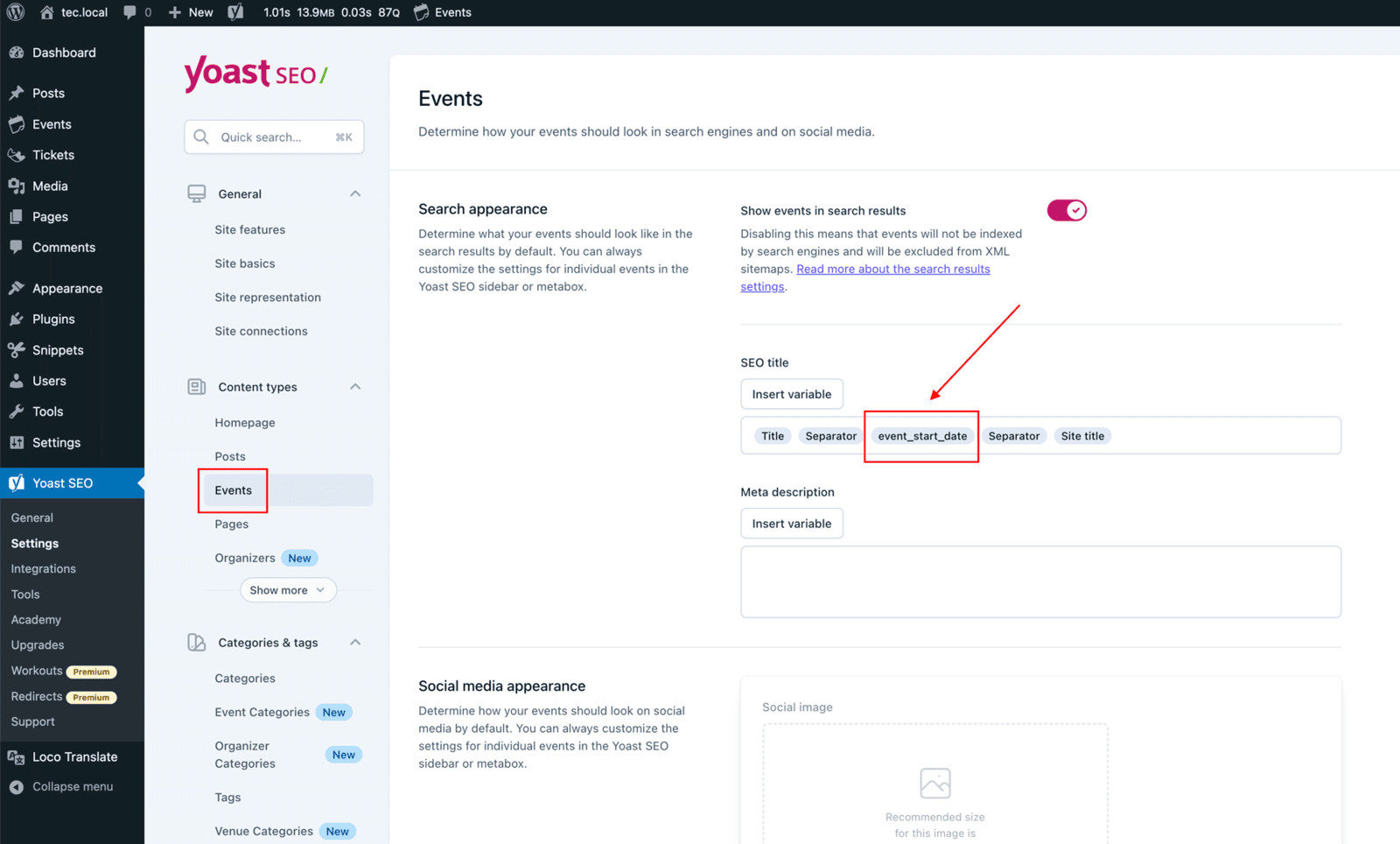
- Go to Yoast SEO > Settings in your WordPress admin.
- Navigate to the Content Types section.
- Locate the Events post type (This option appears only if The Events Calendar is active).
- In the SEO Title field, click the “Insert variable” button.
- Start typing the desired variable (e.g.,
%event_start_date%) or choose from the list of suggestions. - Select the corresponding variable from the suggestions and press Enter.
- You can then rearrange variables, add separators, or include other static text to customize your title template.
Use the Variable in Individual Event Posts
If you’d like to override the title on a per-event basis:
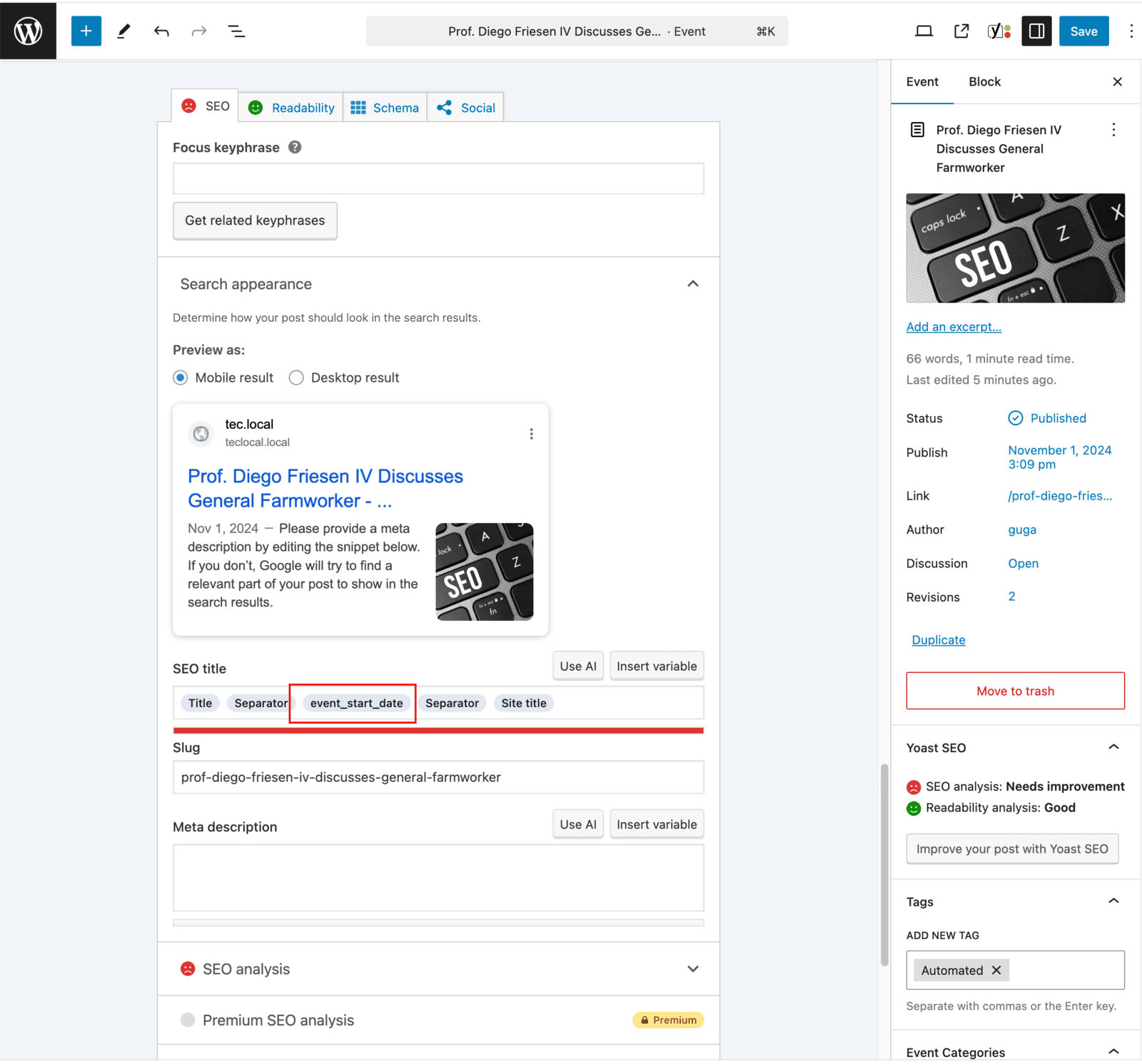
- Edit an individual event post by navigating to Events > All Events, then clicking Edit on the desired event.
- Scroll down to the Yoast SEO meta box.
- Click the SEO tab.
- In the SEO Title field, click the “Insert variable” button and select your desired custom variable (e.g.,
%event_start_date%).
This action will override the global SEO title pattern for this specific event, allowing for a unique, custom title.
Conclusion
By leveraging custom event variables within Yoast SEO, you’re not only tailoring your titles for better search visibility, but also adding meaningful context for both users and search engines. Customizing titles with data like %event_start_date% helps set expectations and boost relevance, which can enhance click-through rates in search results and provide a consistent branding experience.
For any website focused on event promotion, this powerful technique seamlessly connects dynamic event content with precise SEO metadata. This empowers you to scale your optimization efforts efficiently and effectively, ensuring your events get the visibility they deserve.